
Render your 3D scenes on a farm of GPUs. Pay only for what you render.
Upload your scene, pick the cameras and frames, and RenderGlitch splits the work across GPUs. Frames come back as they finish. You pay per use in RenderPoints, with no subscription.
 Blender available 3ds Max soonMaya soon Revit soonand more
25 RenderPoints of welcome credit · 1 RP = €1.00

The farm right now
updates every 5 s
All releases How it works
- 1
Upload your scene
Drop your scene file (today a Blender .blend). A render node opens it and lists its scenes, cameras and frame range, and flags textures that weren't packed.
- 2
Pick cameras & frames
Render one camera, several cameras (one job each), or follow the camera switches on your timeline markers. Choose the priority that fits your deadline.
- 3
Render on GPUs
Frames are split into chunks and rendered in parallel on GPUs: NVIDIA with OptiX or CUDA, plus AMD, Intel Arc and Apple Silicon. Follow the progress live, then pause, reprioritise or cancel whenever you like.
- 4
Watch & download
Play the sequence in the browser as frames arrive, then download single frames or a ZIP of the whole shot.
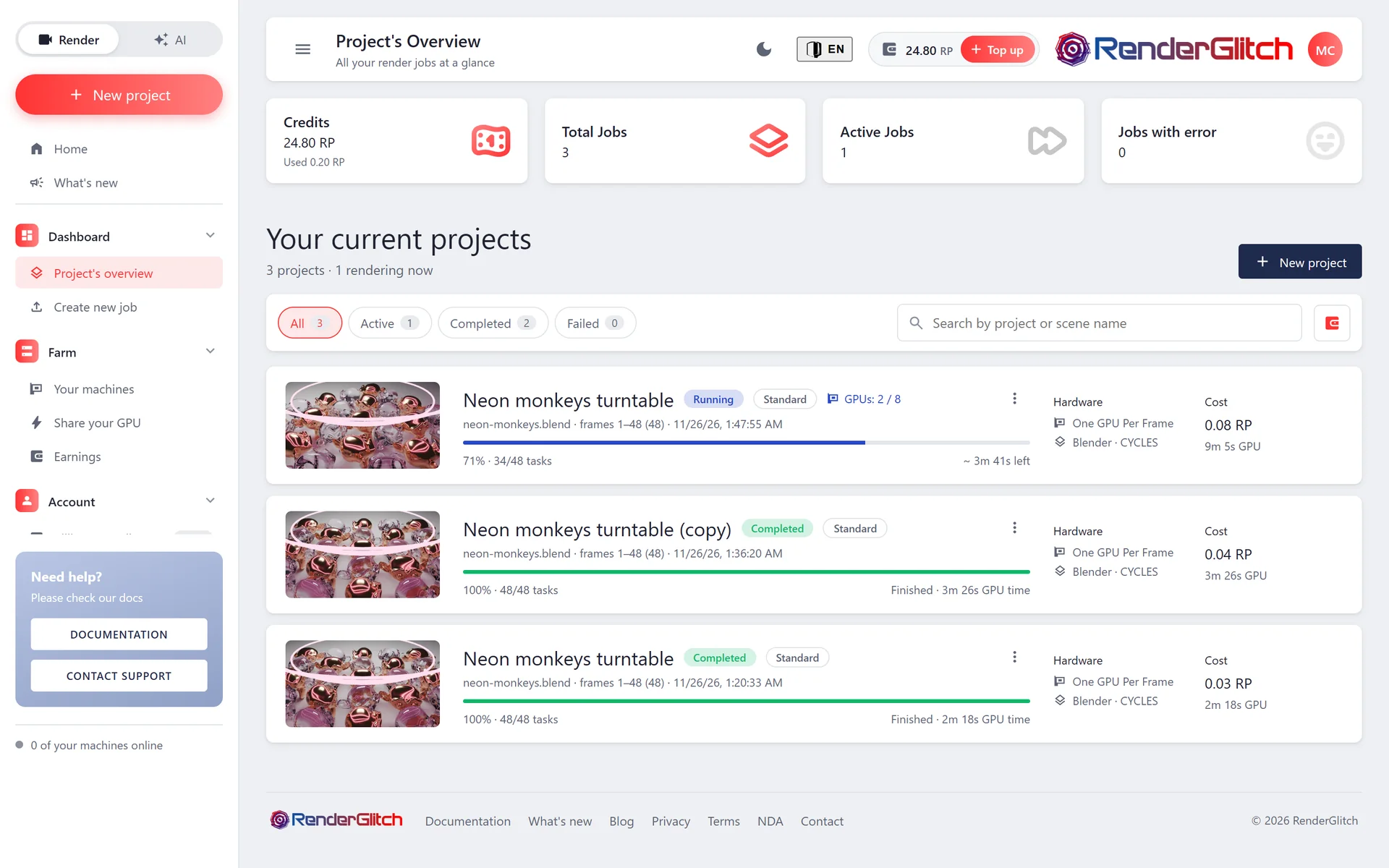
From upload to the last frame
Real screenshots of RenderGlitch, taken while a 48-frame turntable was rendering on the farm.
See it in action
Short walkthroughs recorded on the real app, with on-screen captions: no sound needed.
Render your first Blender scene
Upload, automatic inspection, frames and output, priority, and downloading the result.
Run a Python AI job on GPUs
Write code in the browser, split the work into shards and follow each one in a live console.
Share your GPU and earn
Get your join command, run it, and watch your machine come online.
Rent a GPU server for an AI job
Pick a GPU or a whole server to rent for your job alone, confirm, and follow it on the job page.
Turn an animation into a video
Duplicate a job with new settings, render it, then play and download it as an HD video.
Credits and billing
Your RenderPoints wallet, transactions, levels, top-up packs and the cost calculator.
AI & Python jobs, on the same GPUs
Train, fine-tune or batch-infer in Docker containers with CUDA — on the very machines that render your frames. Paste your code in the browser or upload a project: no cluster to set up.
PyTorch and TensorFlow images ready, or bring your own Split one script into shards across many GPUs, with a live console Containers run without network access; private code can stay on trusted machines
$ python train.py
[rg] shard 3/8 on RTX 4070 SUPER
RG_PROGRESS 0.42   epoch 3 · loss 0.318
✓ 8/8 shards · results readyYour scenes stay yours. NDA included.
Unreleased films, client work, game assets: every scene you upload and every frame we render is covered by our confidentiality agreement, automatically. No paperwork, no extra cost.
We never share or reuse your files, and never train AI on them Every GPU provider is contractually bound to keep your work confidential Render nodes never learn who you are and delete your files after rendering You keep every right to your scenes and frames
Need it signed?
Email us your company's name and we'll send you the NDA signed by RenderGlitch, ready for your client.
Request a signed NDAPricing
You pay for compute, measured in OB-hours: one hour on a GPU, weighted by its OctaneBench score. A faster card costs more per hour but finishes sooner, so the price of a frame stays about the same. Choose how many GPUs render in parallel, or let the priority decide. Uploads, downloads and 30 days of storage are included.
Economy
0.067 ¢ / OBh
≈ €0.50 per GPU-hour · up to 2 GPUs in parallel
Renders when the farm has spare capacity. Best for overnight jobs.
Standard
0.12 ¢ / OBh
≈ €0.90 per GPU-hour · up to 8 GPUs in parallel
Normal queue position, several GPUs in parallel.
Urgent
0.27 ¢ / OBh
≈ €2.03 per GPU-hour · every free GPU, scales up when busy
Jumps the queue and uses every free GPU, including extra GPUs the farm adds on demand when busy.
Students get 50% off. How pricing works
AI jobs on the same GPUs
Python jobs bill on this exact meter at 55% below these rates — same tiers, same wallet.
Enter your frames and roughly how long one frame takes on a decent GPU (render one test frame in Blender to find out).
1.87 RP
≈ €1.87 · 0.007 RP per frame16m 0s
8 GPUs in parallel · plus queue time2h 5m
1,563 OB-hours · 0.90 RP per GPU-hour2.083 GPU-h × 750 OB (typical GPU) × 0.0012 €/OBh = 1.87 RP
Wall-clock time is shorter when frames are split across several GPUs; the cost is the same. OctaneBench scores are approximate.
Share your GPU and earn
Got a graphics card that sits idle? Run one command and your computer joins the pool. It renders Blender frames — and, with Docker installed, runs AI jobs in isolated containers — while the window is open, and stops when you close it. Unfinished work goes back to the farm automatically.
Windows 10/11, macOS 12+ or recent Linux with Blender installed (3ds Max and Maya are detected for later); an NVIDIA, AMD (RX 5000 or newer) or Intel Arc GPU recommended — only NVIDIA also takes AI jobs, CPU-only also works Scenes run with embedded Python disabled; AI jobs run in network-less Docker containers Keep your GPU for yourself any time: just close the window
Joining doesn't mean instant income: your GPU only works, and only earns, when a customer's job is waiting. Once connected it stays ready in the pool and picks up work automatically, so some days are busy and others quiet, especially while the farm is still growing. Leave the window open and the jobs come to you.
Provider rate
0.04 ¢ / OBh
AI jobs: 0.025 ¢ / OBh — containers earn less per hour than renders
| RTX 5090 | ≈ €0.673/h AI ≈ €0.421/h |
| RTX 4090 | ≈ €0.515/h AI ≈ €0.322/h |
| RTX 4070 SUPER | ≈ €0.297/h AI ≈ €0.186/h |
| RTX 3060 | ≈ €0.119/h AI ≈ €0.074/h |
| RTX 4060 Laptop | ≈ €0.103/h AI ≈ €0.064/h |
What would my computer earn?
How money moves
Top up your credits
Prepaid RenderPoints, no subscription. One balance pays for renders and AI jobs.
- Click your balanceIt sits at the top of every page once you're signed in and opens the top-up packs.
- Pick a packFrom 25 to 2,500 RP; bigger packs save up to 30%.
- Pay with StripeSecure checkout with card, PayPal or wallet. Prices include VAT.
- Render right awayCredits land as soon as Stripe confirms the payment and never expire. Rendering is charged per completed task.
Get paid for your GPU
Your computer renders for the farm and every frame it finishes is metered for you.
- Join with one commandCopy your personal command from Share your GPU and run it on your computer.
- Render and earnOnly work your machine finishes counts, priced by render time × GPU score. RenderGlitch keeps 1%.
- Frame checkA random frame is re-rendered on another machine to confirm the work. Earnings are released when it passes, or automatically after 7 days.
- Request your payoutFrom €25 released, ask for it on your Earnings page. We send it by PayPal or bank transfer and show the reference there.